

We’re growing at a breakneck speed at Wishlink. We’re onboarding 100s of creators every month, over 1m users shop from us on a daily basis, and we capture millions of clicks and sales every month. All of this business growth comes with a massive increase in server activity. We, at the platform team are constantly working to support this scale. What makes this particularly challenging is that we must keep costs under control. Infrastructure teams understand this well — cloud bills can grow exponentially if left unchecked.
In this document, we’ll focus on what used to be the largest cost header in our AWS bills — one of our production databases. It was a PostgreSQL database hosted on RDS, and it was enormous.
The database in question used to house transactional data across a few services and had grown to approximately 5 TB in size with tens of billions of rows. At peak times, we would see around half a million IOPS on the disk. Despite extensive tuning of shared_buffers, wal_buffers, work_mem, parallel_* and similar settings, we constantly needed to add more resources to keep our application running. Even autovacuum processes, designed to improve efficiency, added to the database load.
As we continued increasing resources, IOPS, and disk bandwidth, costs became a serious concern. Additionally, we had to maintain five large read replicas for this database. Beyond cost and performance issues, we frequently faced operational problems like failing CDC syncs to our Lakehouse.
Redesigning the applications and splitting the database across applications was our first choice but it wasn’t feasible because that would mean investing a significant engineering bandwidth into doing this migration, which could have been well spent into supporting the growing business and solving user problems. We needed to act quickly!
This story isn’t just about saving money. It’s a story about technical precision, strategic architectural choices, and building a leaner, more powerful foundation for the future. For our fellow engineers facing similar challenges, here’s what all we want to share on this.
The Breaking Point: Our RDS Fortress Was Showing Cracks
Our RDS for PostgreSQL instance was a workhorse, but one designed for a different era. We had reached the inherent limitations that traditional RDS PostgreSQL instances inevitably face.
Here are the major challenges we encountered:
1. Postgres is Postgres
RDS for PostgreSQL operates on the classic master-slave architecture that uses physical streaming replication. The master (or primary) database processes all the write operations and then ships its Write-Ahead Log (WAL) records over the network to the slave instances (the read replicas). Each replica must then receive, process, and apply these changes to its own local data store to catch up with the master.
This presents two crippling problems for a write-heavy and read-heavy workload:
- Replication is an Overhead: The primary database doesn’t just have to handle our application’s write traffic; it also has to do the extra work of packaging and streaming its changes to every single read replica. While the replication overhead wasn’t huge in isolation, our CDC syncs compounded the strain. CPU cycles for WAL generation and replication management, Disk I/O to read and send WAL files etc. are added work nonetheless.
- The Inevitability of Replication Lag: On a database with a high volume of writes, the replicas are in a constant state of “catching up.” This delay is known as replication lag. For us, this lag could become significant during peak traffic, meaning our read replicas were serving stale data. This is unacceptable for many of our critical application features, forcing us to direct even more read traffic to the already overburdened master instance, creating a vicious cycle of load.
2. The Tyranny of Read Replicas and Storage Duplication
To keep our application snappy and responsive, we had to serve an immense number of reads. The standard solution in RDS is to spin up read replicas. We were running five of them.
Here’s the kicker with traditional RDS replicas: each replica is a completely independent database instance with its own provisioned storage. Our primary database was 5TB, our five replicas meant we were provisioning and paying for an additional 25TB of EBS storage. In total, we were paying for storage six times over for the same data. It was an inefficient, brute-force solution to a problem that demanded elegance.
3. The Illusion of “Elasticity”
Everyone loves to talk about cloud elasticity, but our RDS setup offered none where we desperately needed it. There was no native, intelligent autoscaling for read replicas. We really wanted to turn them off during off-hours and add more during peaks. Sure, you might think that why not manually create and delete replicas, or just write a cron which does this on regular basis. But creating read replicas in RDS takes several hours, and each time you create a replica, a new snapshot is created first. This just didn’t work, the off-hours window for us is around 6 hours and sometimes it would take more to just provision a new read replica.
4. The High Cost of High Availability
For failover, we ran Multi-AZ instances. While essential for resilience, this added another layer of significant cost. Not only is the compute for Multi-AZ more expensive, but the underlying synchronous replication also writes data to a standby instance in a different Availability Zone, meaning you are paying for premium, provisioned Multi-AZ storage that sits idle unless a failover occurs. Doubling our costs everywhere.
Aurora: Decoupling Compute from Storage
We explored several options available to us. We spent days running the numbers and benchmarking options. We had to optimise for performance, cost and ease/speed of the fix. We studied and did drills for several alternatives, few of them being:
- Sharding: Promised scalability, but required some major app rewrites, something we would not be able pull off quickly and would consume major tech bandwidth.
- Switching to NoSQL (like DynamoDB): Great for scale, but not suitable for our relational, transactional workload. And again, a major redesign.
- Distributed SQL (like Yugabyte or CockroachDB): Exciting tech, but too new and complex for a fast, safe migration.
- Staying on RDS: Meant continuing to burn money on duplicated storage and hitting performance ceilings.
- Self-managed Postgres on EC2: Gave us control but added heavy operational overhead, plus 5 TB continuous data replication gave me chills.
Aurora gave us the best of all worlds — drop-in compatibility and a really fast migration. We came up with a precise plan and design while using Aurora for RDS. Let’s be clear: on a per-instance or per-unit basis, Aurora is more expensive than RDS. But when we zoomed out and looked at the whole setup — replication, scaling, storage — it came out significantly cheaper.
Before we dive into Aurora’s magic, it’s worth noting: once we switched, there was no easy way back. This raised the stakes of every performance test and cost projection.
Let’s quickly talk about what sets Aurora apart from RDS: decoupling of compute from storage. Aurora decouples compute and storage into a multi-tenant, log-structured, distributed storage service.
Instead of each database instance having its own dedicated, monolithic storage volume, all nodes in an Aurora cluster — both the primary writer and the read replicas — point to the same, single, shared storage volume.
This isn’t just a minor difference; it’s a game-changer.
- No More Storage Duplication: When we create a read replica in Aurora, we are not creating a new copy of our data. We are simply spinning up a new compute instance that connects to the existing shared volume. Our 5TB database remains a 5TB storage footprint, whether we have one replica or fifteen. The cost savings from this alone are massive. While Aurora maintains 6 copies of this storage internally, we are only charged for 1.
- Blazing Fast Replica Creation: Because there’s no data to copy, new Aurora Replicas can be launched in 6–8 minutes, not hours. This enables true, effective autoscaling.
- True Autoscaling That Just Works: We configured Aurora Auto Scaling to monitor the average CPU utilization of our cluster. When it crosses our defined threshold, Aurora automatically adds a new replica. When traffic cools down, it gracefully removes it. This is the hands-off, cost-efficient elasticity we’d been dreaming of. Our capacity now perfectly matches our demand, eliminating waste.
- Failovers: In Aurora, the failovers happen in a way that one of the reader instances (read replica in RDS world), gets promoted to be the writer (master). So there is essentially no need of multi-az setups. This saved us from the cost we were paying for idle machines just for failovers. And the difference is not just 50%, it is more because mutli-az storage is more expensive. Aurora failovers are infact faster (usually 30 seconds) as compared to RDS multi-az failovers (around 2 minutes).
Aurora read scaling is great, but what about write throughput? We were still limited by single-writer architecture, but for our use case, read scaling solved 80% of the pain.
Let’s look at before vs after
Before (RDS):
- 5TB primary + 25TB replica storage
- IOPS and Disk bandwidth additional charges
- Over provisioned read replicas
- Multi-AZ machine and storage
After (Aurora):
- 5TB shared storage (6x copies for high availability and redundancy, 1x charge)
- Auto-scaling replicas
- Fixed I/O cost
- No Multi-AZ idle cost
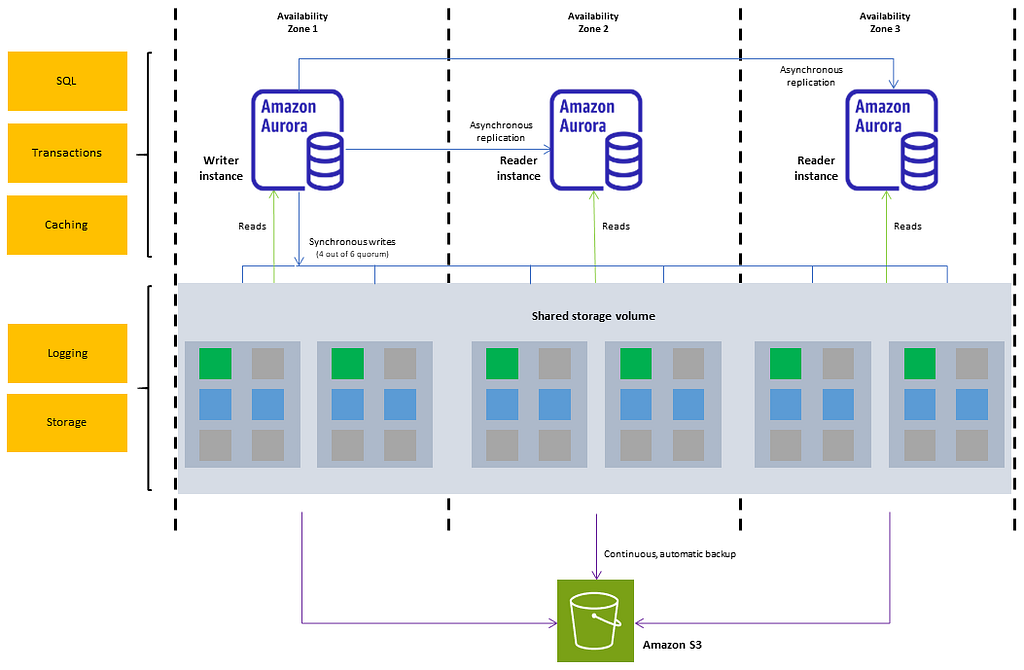
Our Aurora setup was straightforward. We had a cluster with a writer and a reader endpoint. We had two fixed machines in the cluster (for reader and writer each), and then we had an autoscaling policy to scale things at 70% cpu usage for us. As a new reader got added by autoscaling policies, the new reader was automatically added to the reader endpoint and we didn’t even feel it happening.
The Migration
One of the key reasons we chose Aurora was the ease of migration. AWS provides an option to create an Aurora reader from an existing RDS instance.
We simply had to promote the Aurora reader to a standalone Aurora cluster and then start using it. However, the switch wasn’t as simple as it sounds. It involved burning the midnight oil to minimize downtime and carefully prevent any data or business loss. We won’t be discussing those details here, but it certainly wasn’t straightforward.
The most risky aspect of the migration was this:
Moving from RDS to Aurora is easy, but the reverse isn’t. If Aurora failed to work for us due to incorrect calculations or load tests, our only option would be creating a new RDS instance and migrating data from Aurora using a service like DMS. In short, we couldn’t afford to get this wrong. Reverting our Aurora migration would take dedicated effort of days and careful planning once again, a downtime once again and a business hit once again — something that was not at all acceptable. Monolith DB switches are not easy, there is so much that can go wrong, you have to go through it to get it.

Thanks to our careful study of Aurora, thorough load tests, and precise cost calculations, Aurora worked perfectly for us. The atmosphere in the war room when we saw the autoscaling trigger activate as traffic increased confirmed how meticulously we had evaluated every aspect of the migration.
Two days later, the finance team was celebrating when they saw the sudden drop in the AWS cost explorer.
Why Aurora I/O-Optimized Was a Non-Negotiable for Us
Aurora has a higher base cost compared to RDS. It also introduces a variable cost component related to IOPS.
Our workload is intense. The sheer volume of transactions generates an astronomical number of I/O operations (reads and writes to the storage layer).
The standard Aurora pricing model charges per million I/O requests. While this works for many workloads, for us it would have been financially disastrous. Our I/O bill would have been both unpredictable and enormous.
This is where Aurora I/O-Optimized comes in. It offers a fixed-price model where you pay a predictable price for database instances and storage, with all I/O operations included. For a high-throughput application like Wishlink, this choice was obvious. It provides complete cost predictability, insulating us from traffic volatility and allowing us to focus on growth rather than I/O consumption. We’re essentially paying a flat fee for an all-you-can-eat I/O buffet — and our appetite is huge. Even though the I/O-Optimized model increases storage costs ($0.248 per GB-month versus $0.11 per GB-month), it still made complete sense for us.
AWS recommends switching to I/O-Optimized once IOPS costs exceed 25% of total database costs.
I’ll be honest: if the I/O-Optimized pricing option hadn’t been available, Aurora wouldn’t have been viable for us at all. In fact I remember not considering Aurora some time back with the variable cost model, AWS then released I/O-Optimized in 2023.
The Final Challenge: Cost Attribution
In our old RDS world, we attributed costs to different business units by assigning tags to the read replicas they primarily used. However, our Aurora setup includes only reader and writer groups, making it impossible to attribute read costs to specific services and teams using the same method.
To solve this challenge, we implemented a more sophisticated approach using the pg_stat_statements extension. This powerful PostgreSQL tool tracks execution statistics for every SQL query that runs on the database.
Our improved process works as follows:
- Our applications populate the application column in pg_stat_activity
- We join pg_stat_activity with pg_stat_statements to compute database time usage by each application
- We export this data to our monitoring stack (since pg_stat_activity only shows live sessions)
- We then attribute reader costs to each business unit proportionally based on their usage
While not perfectly precise, this solution comes very close to accurate cost attribution.
The Result:
The outcome of this migration has been nothing short of transformative.
- Cost: A staggering 50% reduction in our total database expenditure.
- Performance: Unwavering, highly available performance, even under peak load.
- Operations: A massive reduction in operational overhead. No more manual scaling, no more storage management gymnastics.
- Scalability: A truly elastic architecture that can grow seamlessly with our business.
This fixed the cost and performance issues for now. But let’s be honest, we had only deferred the real problem. Today we run a multitude of different databases as per the use case and some very fine-tuned caching. All the alternatives we explored during this migration are now a part of the massive-data driven work we do daily. Topic for another blog, and I am already gearing up for it.
While I do that, remember this, a proprietary managed solution doesn’t always have to be costlier — as long as you do the Maths right.